
LAB 4
SCCM & MS Intune

The system center configuration manager is a critical toolfor IT professionals and organizations seeking to efficiently manage their ITinfrastructure.
This comprehensive system allows for the effective managementof devices and applications across a variety of platforms, providing acentralized solution for tasks such as software distribution, operating systemdeployment, and security patch management.
One of its notable features is the capability to streamlineand automate IT tasks, thereby saving valuable time and resources for IT teams.
Additionally, its robust security features help ensure that devices andapplications are properly safeguarded, reducing the risk of security breachesand vulnerabilities within the infrastructure.
Furthermore, the system center configuration manager offersvaluable insights and reporting capabilities, empowering administrators to gaina deeper understanding of their IT environment and make informed decisions tooptimize performance and efficiency.
With its scalability and flexibility, thissystem is well-equipped to meet the evolving needs of modern IT environments.
In this lab, I tried to set up a dedicated SCCM server. Ittook forever because of all the prerequisites and requirements, which you canfind in detail here: Siteprerequisites – Configuration Manager | Microsoft Learn.
My server specs as following:
- 2 Processor with total of 8 cores.
- 8 GB RAM
- 8 Storage drive according to Microsoft best practices deployment shown as following below:
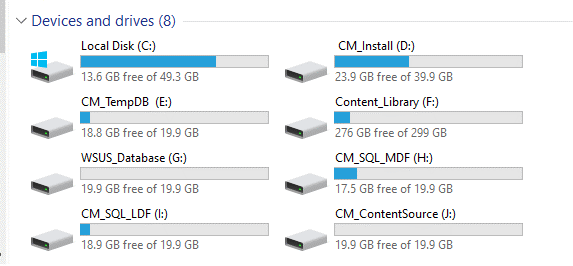
SCCM deployment takes a lot of effort and patience to do itright. It involves configuring its SQL server database, enhancing SCCM databaseperformance by allocating the right amount of RAM, and installing the requiredserver roles like WSUS.
Additionally, the deployment process includes taskssuch as setting up boundaries and boundary groups, configuring discoverymethods, deploying the Configuration Manager client, and managing distributionpoints.
Each step demands meticulous attention to detail to ensure the overalleffectiveness of the SCCM infrastructure. Furthermore, optimizing SQL serverperformance, ensuring high availability, and securing the SCCM environment areessential considerations for successful deployment.
By prioritizing these aspects,organizations can streamline their software deployment, updates, and assetmanagement processes, ultimately maximizing the value of their SCCM investment.
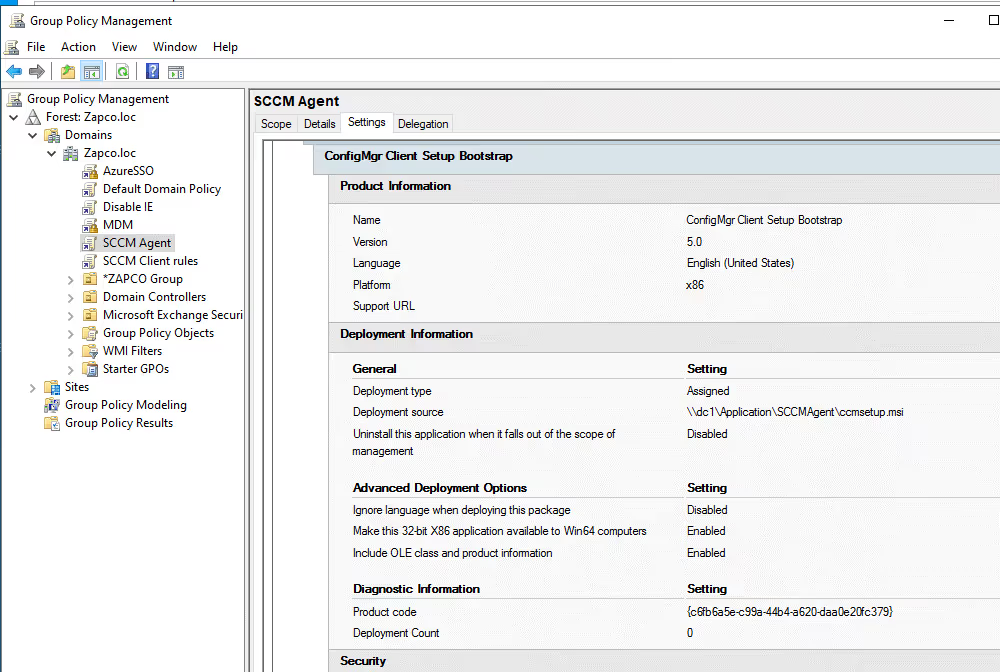
After the deployment of the SCCM Server, it is necessary toenroll devices within our domain to SCCM in order to effectively manage andcontrol their patch management.
The most efficient method to achieve this isthrough the implementation of a Group Policy rule, as outlined below:
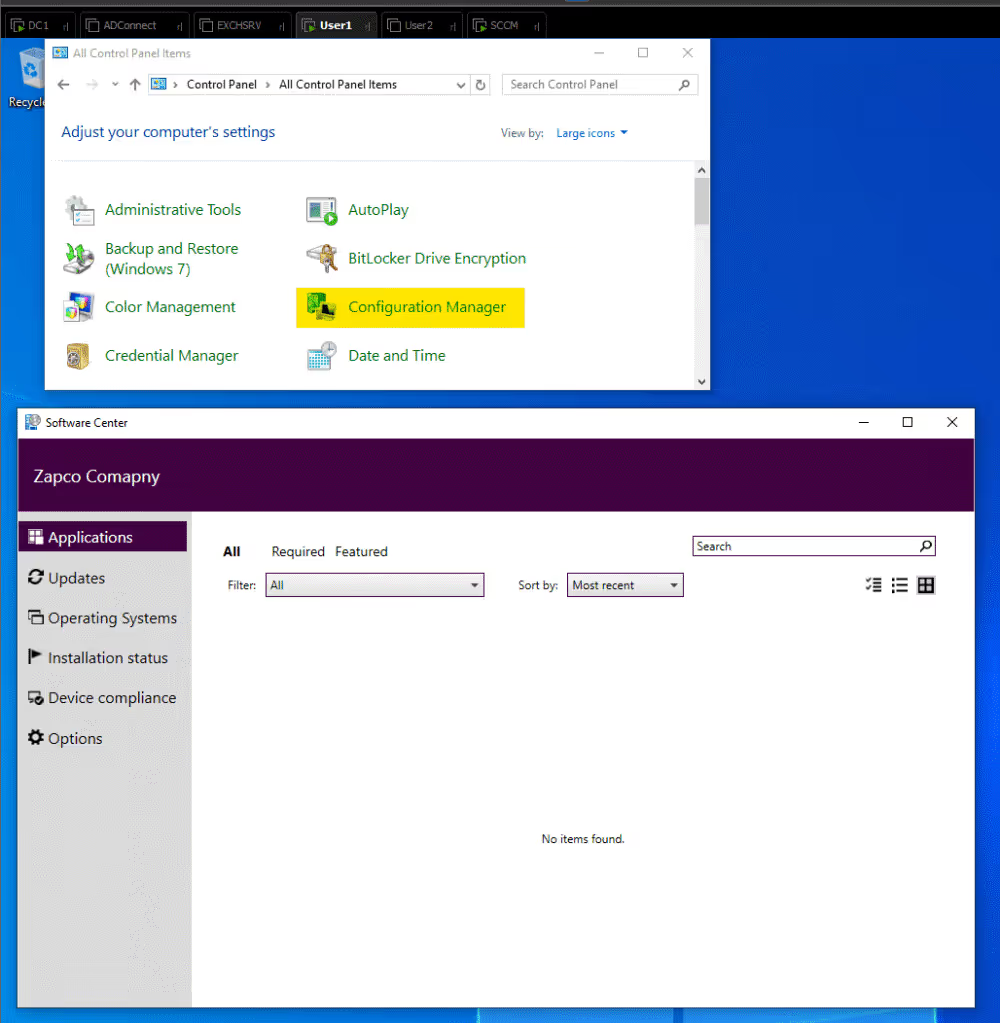
After successfully deploying the SCCM Agent for users, wecan observe several indications of its presence. For instance, within theControl Panel, the SCCM agent is usually visible.
Its presence serves variouspurposes, such as facilitating troubleshooting and triggering policysynchronization.
Additionally, users can access the Software Center, throughwhich they can view the upcoming patches and take necessary actions.
This provides a convenient and centralized platform for users to stay informed aboutand manage the latest software updates and patches.
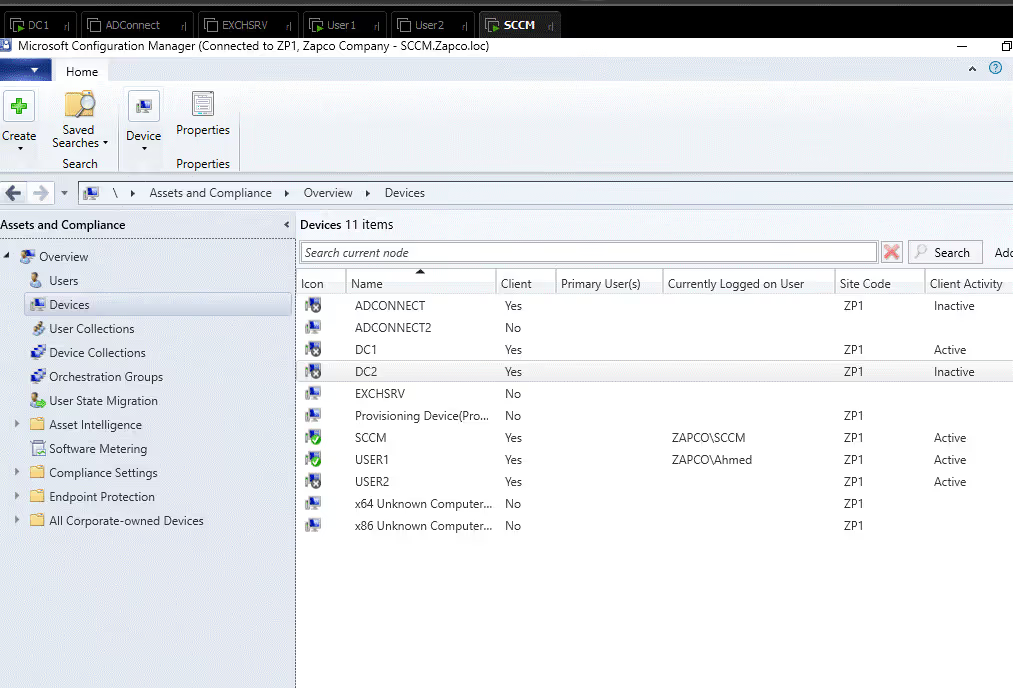
In the SCCM assets and compliance management, we are able toview the enrolled devices within our environment along with the currentlylogged on user for each device.
Another new feature in SCCM is co-management, a big stepforward in device management for businesses. Co-management allows using bothConfiguration Manager and Microsoft Intune at the same time to manage a singledevice.
This approach lets organizations benefit from both platforms, makingdevice management processes smoother and more efficient.
IT administrators caneasily move workloads and policies between Configuration Manager and Intune,giving them more flexibility and control over device management strategies.
This integration provides a unified solution for managing device configuration,security, and application deployment, leading to a more cohesive andcomprehensive device management setup.